"In Visual Basic, you can pass an argument to a procedure by value or by reference by specifying the ByVal or ByRef keywords, respectively. Passing an argument by value means the procedure cannot modify the contents of the variable element in the calling code underlying the argument. Passing by reference allows the procedure to modify the contents in the same way that the calling code itself can."
From http://msdn.microsoft.com/en-us/library/ddck1z30(v=vs.71).aspx
Showing posts with label Parameters. Show all posts
Showing posts with label Parameters. Show all posts
Sunday, April 17, 2011

Parameter Arrays
"Usually, you cannot call a procedure with more arguments than the procedure declaration specifies. When you need an indefinite number of arguments, you can declare a parameter array, which allows a procedure to accept an array of values for a parameter. You do not have to know the number of elements in the parameter array when you define the procedure. The array size is determined individually by each call to the procedure."
From http://msdn.microsoft.com/en-us/library/538f81ec%28v=VS.100%29.aspx
From http://msdn.microsoft.com/en-us/library/538f81ec%28v=VS.100%29.aspx
Wednesday, October 27, 2010
Parameters (place-holder values)
SQL statements may contain ‘hard-coded’ values such as the following:
..or they may contain a parameter(s) that is used as a place-holder value such as in the following:
Using a parameter allows the SQL statement to work dynamically - that is, to take a current value and use it in the query. A parameter is preceded by the ‘@’ symbol.
When we define a parameter, we must provide further explanation as to where the real value will come from, at run time.
Note the following code sample:
This select command includes two parameters - @CustomerID and @LastName. The next two statements inform the command object of where to find the actual values to use. The @CustomerID parameter’s value can be found in the text property of the label called lblCustomerID and the @LastName parameter value can be found in the text property of the label called lblLastName.
Notes on using parameters:
• Parameter names are preceded by the ‘@’ symbol
• You may name a parameter anything you like, however convention is to name the parameter strictly after the field name it represents.
• Each parameter must be passed to the command object’s Parameters.AddWithValue method
• Parameters must be passed to the command object’s Parameters.AddWithValue method in the same order as they are defined in the SQL statement.
• Spelling and case must match
SELECT FieldName1, FieldName2 FROM TableName WHERE ColumnID = ‘1’ AND FieldName1 = ‘X’
..or they may contain a parameter(s) that is used as a place-holder value such as in the following:
SELECT FieldName1, FieldName2 FROM TableName WHERE ColumnID = @ColumnID AND FieldName1 = @FieldName
Using a parameter allows the SQL statement to work dynamically - that is, to take a current value and use it in the query. A parameter is preceded by the ‘@’ symbol.
When we define a parameter, we must provide further explanation as to where the real value will come from, at run time.
Note the following code sample:
Dim strConnectionString As String = "Provider=Microsoft.Ace.OLEDB.12.0;" & _
"Data Source=C:\FolderName\DatabaseName.accdb"
Dim MyConnection As New OleDb.OleDbConnection(strConnectionString)
MyConnection.Open()
Dim MyCommand As New OleDb.OleDbCommand("SELECT * FROM Customers WHERE CustomerID = @CustomerID AND LastName = @LastName", MyConnection)
MyCommand.Parameters.AddWithValue(“@CustomerID”, lblCustomerID.Text)
MyCommand.Parameters.AddWithValue(“@LastName”, lblLastName.Text)
Dim MyDataset As New Data.DataSet
Dim MyDataAdapter As New OleDb.OleDbDataAdapter(MyCommand)
MyDataAdapter.Fill(MyDataset, "MyQueryResults")
MyConnection.Close()
This select command includes two parameters - @CustomerID and @LastName. The next two statements inform the command object of where to find the actual values to use. The @CustomerID parameter’s value can be found in the text property of the label called lblCustomerID and the @LastName parameter value can be found in the text property of the label called lblLastName.
Notes on using parameters:
• Parameter names are preceded by the ‘@’ symbol
• You may name a parameter anything you like, however convention is to name the parameter strictly after the field name it represents.
• Each parameter must be passed to the command object’s Parameters.AddWithValue method
• Parameters must be passed to the command object’s Parameters.AddWithValue method in the same order as they are defined in the SQL statement.
• Spelling and case must match
The Constructor - New()
A constructor is represented on a class diagram as: Visibility New(ParametersIfAny) and is always the first behavior in the list.
A constructor behavior may require parameters to execute. This solely depends on the requirements of the system and the design of the object. Parameters are required if it makes sense that the object should know something about its state upon creation.
For instance, an object created from the Player class would not make much sense if it's Name state did not have a value. The account status of the object may also be very important to establish. In the diagram below, you will notice that the constructor for the Player object contains a number of parameters.
A constructor behavior may require parameters to execute. This solely depends on the requirements of the system and the design of the object. Parameters are required if it makes sense that the object should know something about its state upon creation.
For instance, an object created from the Player class would not make much sense if it's Name state did not have a value. The account status of the object may also be very important to establish. In the diagram below, you will notice that the constructor for the Player object contains a number of parameters.
+New(NewName: String, NewHealth: Integer, AccountStatus: Boolean, NewPassword: String)
As the designer of the class, I have decided that a Player object would not make sense unless all of the states were established at the time of object instantiation, however, the Sword and Flight class do not require any parameters for object instantiation.
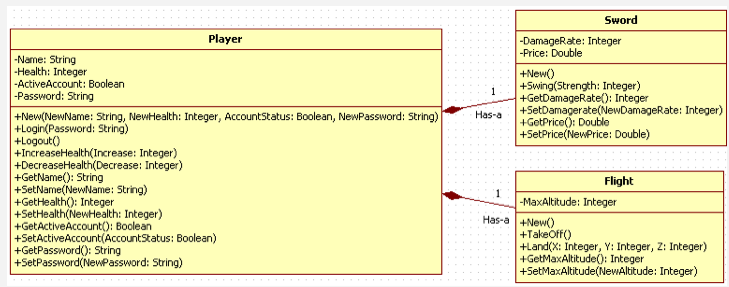
Note: A constructor behavior cannot return a value, therefore it is always implemented as a subroutine.
Parameters
The inputs required by a behavior are often called Parameters and like state, a data type is required in the definition of a parameter.
The format for representing parameters in a behavior:
BehaviorName(Parameter: DataType)
The format for representing a behavior that has no parameters:
BehaviorName()
Class example:

The Login behavior of a class called Player class may look like this:
Login(Password: String)The parenthesis (brackets) which follow the name of the behavior are used to identify any parameters that are required for the behavior to function. In this case of the Login behavior, a parameter called Password which has a data type of String is required by the behavior for it to function. In other words, the Player class has a Login function but it needs a String password to execute.
The Logout behavior of the Player class looks like this:
Logout()
You will notice that the parenthesis for this behavior are empty. This behavior does not require any parameters to execute.
There are two behaviors in the Player class which are responsible for increasing and decreasing the Player class Health state:
IncreaseHealth(Increase: Integer)
DecreaseHealth(Decrease: Integer)
Both of these behaviors require an Integer (whole number) parameter. In other words, these behaviors need to know how much to increase or decrease the Player Health state. As you might imagine, a Player may incur varying amounts of damage or gain varying amounts of health depending on the various interactions within game play.
Constructor
The constructor of a class is implemented as a subroutine. The constructor may or may not require parameters. A subroutine cannot return a value.
Code eg 1: Constructor with no paramters
Code eg 2: Constructor with paramters
Code eg 1: Constructor with no paramters
Public Sub New()
' Code does something...
End Sub
Code eg 2: Constructor with paramters
Public Sub New(NumberOfPoints As Integer, UserName As String)
' Code does something with parameters...
End Sub
Programming Behavior
Each behavior of a class is implemented as a procedure. A procedure may be a subroutine or a function.
Procedures may or not require parameters to execute.
Subroutine
When the behavior simply needs to execute some code, we use a subroutine.
Function
When the behavior is required to return a value to calling procedure, we use a function.
Public Function getLastName(FirstName: String) As String
'Code does something with parameters...
Return LastName
End Sub
Procedures may or not require parameters to execute.
Subroutine
When the behavior simply needs to execute some code, we use a subroutine.
Code eg 1: Subroutine with no parameters
Public Sub NameOfBehavior()
'Code does something
End Sub
'Code does something
End Sub
Code eg 2: Subroutine with parameters
Public Sub Login(UserName: String, Password: String)
'Code does something with parameters...
End Sub
'Code does something with parameters...
End Sub
Function
When the behavior is required to return a value to calling procedure, we use a function.
Code eg 1: Function with no parameters
Public Function NameOfFunction() As String
'Code does something
Return "Sample return String"
End Sub
'Code does something
Return "Sample return String"
End Sub
Code eg 2: Function with parameters
'Code does something with parameters...
Return LastName
End Sub
Parameters in Subroutines & Functions
Sometimes a behavior will require further information to accomplish a task. When an input is required for a behavior to execute, this input is passed to the procedure as one or a number of parameters (sometimes called arguments).
Code eg: Subprocedure using parameters.
Public Sub Login(Username As String, Password As String)
' Code does something
End Function
' Code does something
End Function
Code eg: Function using parameters.
Public Function Calculate(NumberOne As Integer, NumberTwo As Integer) As Integer
' Code does something
Return AValue
End Function
' Code does something
Return AValue
End Function
Sunday, October 17, 2010
Using parameters with queries and reports
"Using parameters with queries and reports - Access - Microsoft Office" ( http://bit.ly/cGEVmI )
Subscribe to:
Posts (Atom)